Community-built study

ES & NQ Gamma Exposure
for MotiveWave

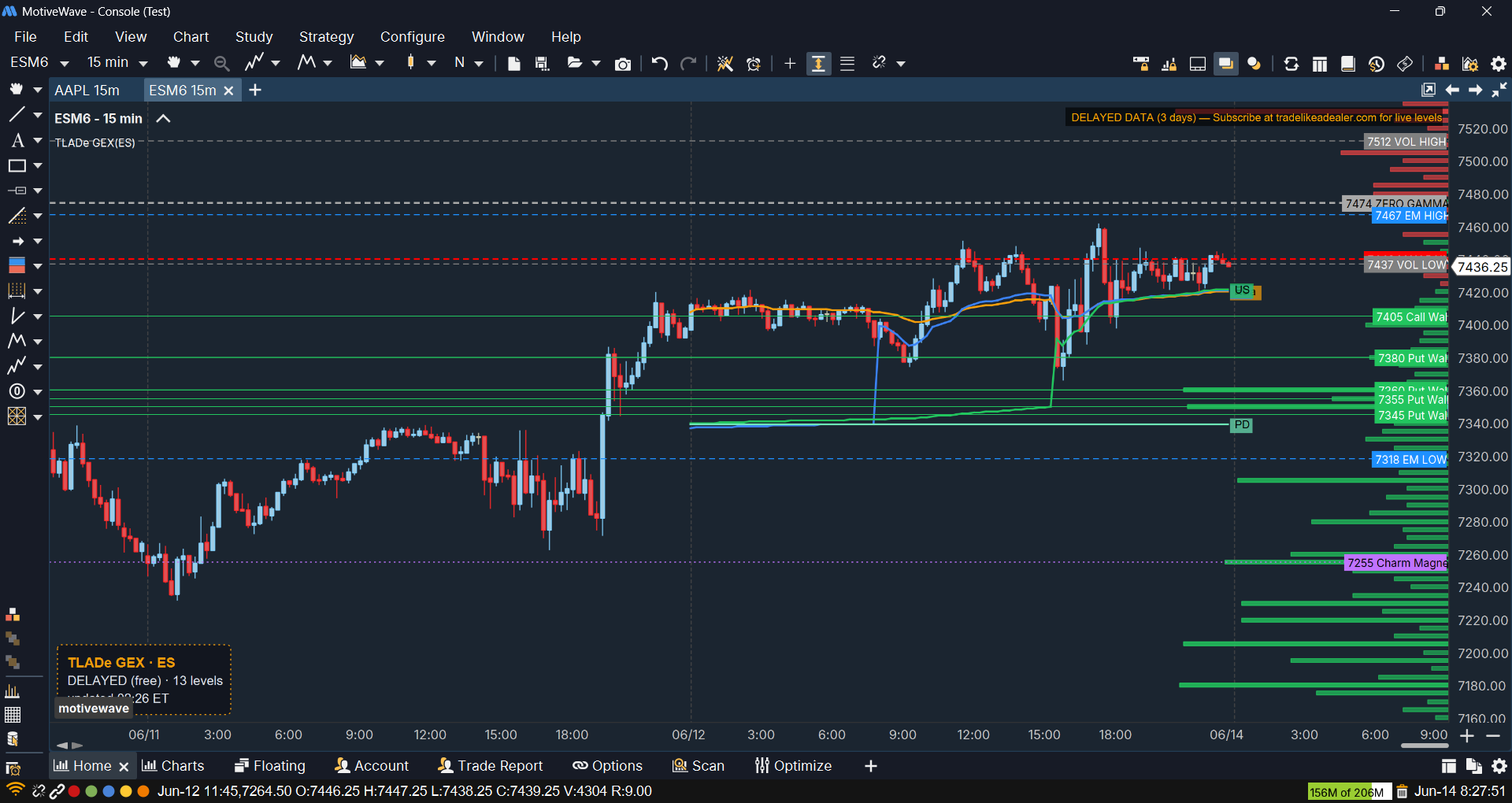
Overlay TLADe GEX levels — call walls, put walls, zero gamma, expected move, vol bands, Charm Magnet and Session AVWAP — right on your MotiveWave chart. A single native Java study that fetches its data from the TLADe cloud. No bridge, no receiver.

Get the Indicator Open the Terminal
✓ Windows ✓ macOS ✓ Linux ✓ Java 25+
TLADe GEX Dashboard study running on a MotiveWave chart for ES futures, showing call/put walls, zero gamma, expected move and Session AVWAP overlaid on the price.

One study.
Cloud data, native chart.

The MotiveWave indicator ships as a single Java study — no local bridge, no Python receiver. Drop the jar into your MotiveWave Extensions folder, add the study to an ES or NQ chart, and paste your API key. It auto-fetches the latest TLADe levels and paints them on the chart.

What the study does

A tick-independent scheduler polls the TLADe cloud at each session window — Asia 18:01, Europe 02:00, Pre-Open 08:00, RTH Open 09:30, Opening Range 10:30, Close 13:00 ET — and redraws call walls, put walls, zero gamma, max pain, expected move, vol bands, Charm Magnet and Breakout zones, plus the per-strike GEX profile. No ticks required, so it refreshes even on quiet pre-market hours.

Community-maintained Ported to MotiveWave by Herat Acharya from the TLADe reference indicator. Source under MIT on GitHub — issues, PRs and platform forks welcome. Stefano hosts the canonical build and ships fixes upstream.

The full TLADe layer, on MotiveWave

📊

GEX Dashboard

Call walls, put walls, zero gamma, max pain, expected move and vol bands drawn on your MotiveWave chart, with the full GEX profile in the right margin. Same data layer as the TLADe Terminal — only the renderer changes.

📐

Session AVWAP

Anchored VWAP for the Asia, London/EU, US and prior-day sessions, computed locally on the chart bars — the same four session anchors as the TradingView indicator, each individually toggleable.

🧲

Charm Magnet & Breakout

The Charm Magnet level and the Breakout (BL/BS) zones surfaced straight from the cloud, so the dealer-flow context you read on the terminal is on the chart too.

🔄

Tick-independent auto-refresh

An absolute-time scheduler fires at every session window with your API key — no need to toggle the study off and on. A compact, repositionable status banner shows the data mode and the last update time.

Get started in 4 steps

1

Subscribe to TLADe

Any active plan (Daily $1.99, Monthly $9.99, Yearly $99*) unlocks the live data the study fetches each session.

*Prices exclude EU VAT where applicable

2

Download the study

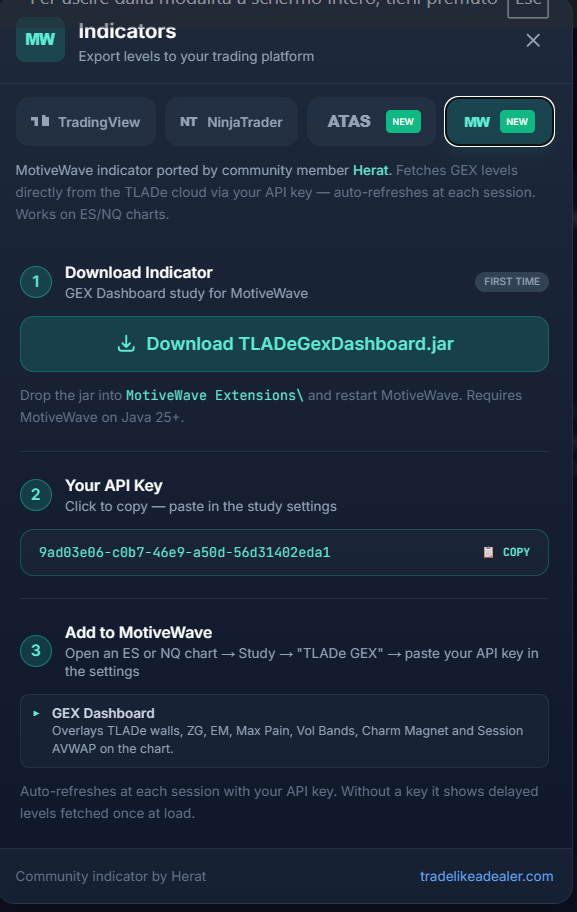
Grab TLADeGexDashboard.jar from the latest release. The same jar runs on Windows, macOS and Linux — it needs MotiveWave on Java 25 or newer.

3

Install in MotiveWave Extensions

Close MotiveWave, drop the jar into your MotiveWave Extensions folder, then reopen. Add the study to an ES or NQ chart: Study → My Studies → "TLADe GEX".

4

Paste your API key

Open the study settings → Data → API Key → paste the key from the terminal's Indicators modal. The scheduler takes over and auto-refreshes your levels at every session. Leave it blank for free, delayed data fetched once at load.

Run your edge inside MotiveWave.

Same TLADe data layer, native to your MotiveWave charts. Free study, MIT-licensed, community-maintained across Windows, macOS and Linux.

Start with TLADe View on GitHub